

An update on what’s new in MoFlo — the open-source npm package that upgrades Claude Code with full project knowledge, persistent memory, sandboxed automation, and a swarm of agents that actually stay wired together.
- GitHub: github.com/eric-cielo/moflo
- npm: npmjs.com/package/moflo —
npm install --save-dev moflo
Behold — we have conjured the Luminarium, a great orb of scrying through which all the workings of Claude and MoFlo are laid bare!
OK, fine. It’s a dashboard. But it’s a really nice dashboard, and once you’ve used it for ten minutes you start wondering how you were supposed to trust an AI agent without one.
MoFlo runs a lot of moving parts in the background: a daemon, a fleet of workers indexing your repo and consolidating memory, a scheduler firing off spells on cron triggers, a runner driving issues from /flo to PRs, and a memory database that quietly accumulates everything the team learns. Most of that machinery is invisible by design — it’s supposed to just work. But “just works” without observability is faith, not engineering. The Luminarium gives you the receipts.
It’s a small, read-only HTTP server that ships with the daemon. In Claude Code, use the /luminarium skill to get an http link and you’re looking at the live state of MoFlo on your machine — workers, schedules, memory, spell runs — and what Claude itself has been doing for this project locally. No login, no cloud, no telemetry — it binds to 127.0.0.1 only. The daemon serves it; nothing leaves the box.
Most of the tabs answer “what is MoFlo up to?” The newest one answers “what has Claude been up to?” Both views, same dashboard, same privacy posture.
The status strip — is the daemon actually doing anything?
Every page is anchored by a small status bar across the top: Status, PID, Uptime, Workers, and Max Concurrent. This is the answer to the most boring and most common question in any MoFlo support thread — is the daemon up? If the green dot is on and uptime is climbing, every other thing in this post is happening live. If it’s not, that’s the first thing to fix; flo healer can usually do it for you.
Workers — the small, patient creatures keeping your index honest
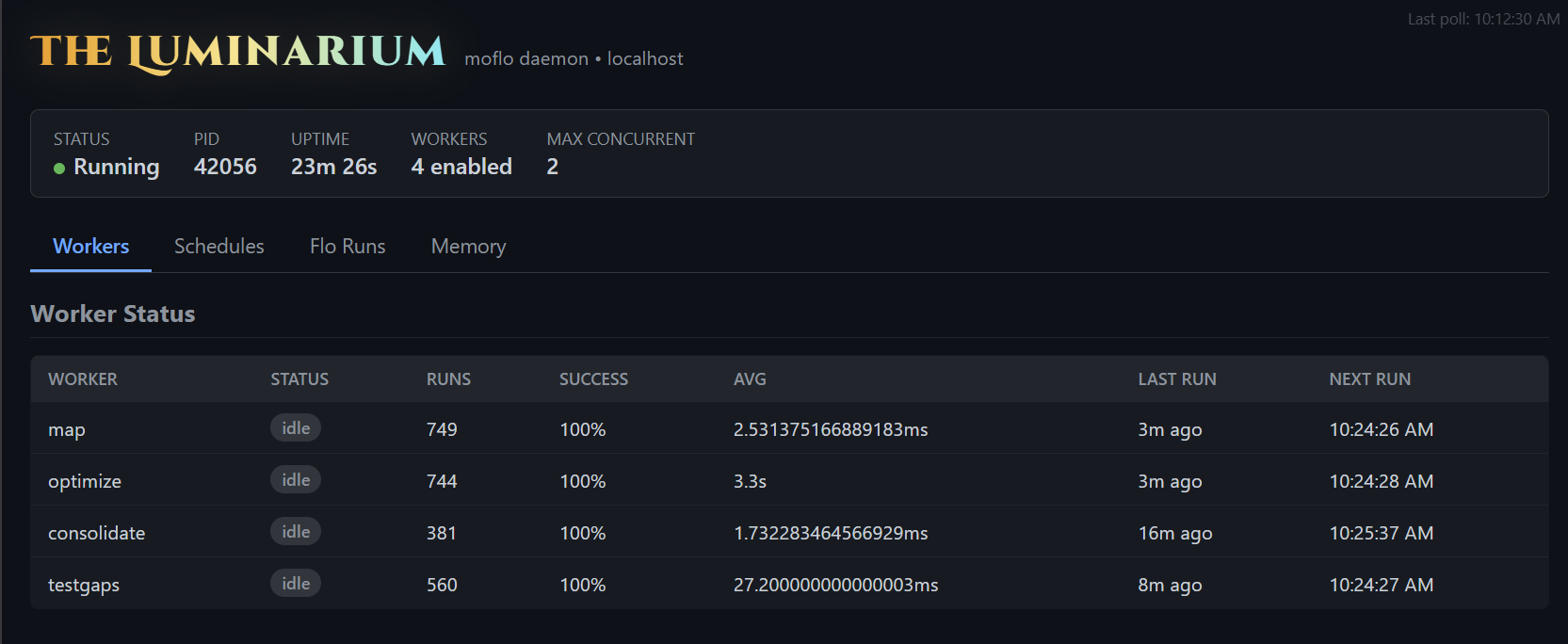
The first tab is the worker fleet. Four background workers run on intervals, each with a single, narrow job:
map— re-indexes your code structure (exports, classes, functions, types). It runs every 15 minutes, hashes files, and only re-embeds the ones that actually changed. This is what powers Claude’s “where is X defined?” answer without a single Glob.optimize— a headless AI worker that scans for performance smells: N+1 patterns, unnecessary re-renders, missing caching, suspicious memory retention. Runs hourly; findings land in memory for the next session to consume.consolidate— promotes short-term patterns to long-term memory, prunes anything stale, and deduplicates. Runs every 30 minutes. This is the worker that keeps the memory store from turning into an attic.testgaps— another headless worker that maps your tests against your source and flags what’s untested or undertested. Hourly. Skeleton tests for the gaps land in memory the same way.
The table tells you, for each worker: how many times it has run, the success rate, the average duration, when it last ran, and when it’ll run next. If something’s silently failing — a stale lockfile, an embeddings runtime issue, a worker that started crash-looping after an upgrade — you see it here, in plain numbers, instead of finding out three sessions later when Claude can’t find a file you know it indexed.
Schedules — the spells running on their own
The second tab is the spell scheduler. MoFlo’s automation primitive is the spell — a YAML or JSON file composing step commands (bash, github, browser, memory, agent, IMAP, Slack, MCP, …) into a runnable workflow. Spells back the /flo issue runner, the epic orchestrator, and any custom automation you write. Many of them are useful on a recurring schedule.
The Schedules tab lists every cron-triggered or interval-triggered spell the daemon is watching: the spell name, its trigger expression, when it last fired, when it’ll next fire, and whether the last run succeeded. If a scheduled spell has been quietly failing for three days because a credential expired, this is the page that surfaces it — instead of you noticing because the downstream artifact stopped showing up.
If scheduler.enabled is false in your moflo.yaml, the tab tells you that explicitly rather than rendering an empty list — the difference between “off on purpose” and “broken” matters.
Flo Runs — the step-by-step record of every spell execution
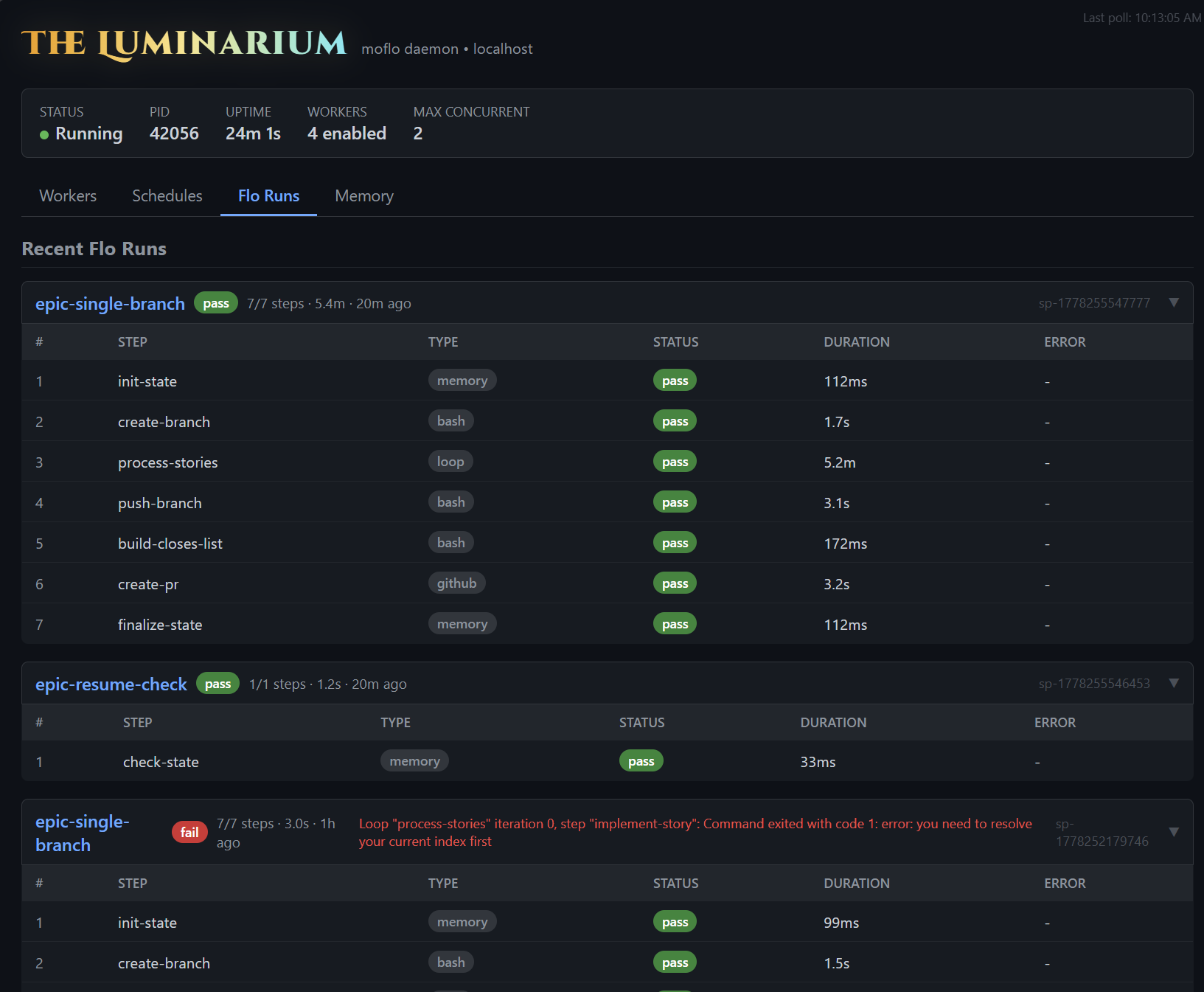
This is the tab I find myself opening most often, and the one that pays for the Luminarium ten times over. Every spell run — /flo, flo epic, scheduled spells, anything you cast manually — leaves a per-step trace here. Not “the run failed somewhere”; the actual step that failed, what type it was, how long it took, and the exact error string the runner captured.
Each run is a card with the spell name, run id, total duration, and step count. Inside, every step has its own row: which step, what type (memory, bash, loop, github, …), pass/fail, duration, and the error if there was one. If flo epic is running 7 stories sequentially, you can see exactly which story failed, on which step, with what message — without trawling logs, re-running anything, or asking Claude to investigate a black box.
That visibility changes how you work with spells. You stop guessing and start tweaking. A bash step took 6 minutes when it should take 30 seconds? You can see it and shorten the step. The create-pr step fails for one story but passes for the others? You know exactly which precondition is missing in that one branch. A scheduled spell has been red for two days because a credential rotated? The run cards show it on the first glance instead of you noticing because the downstream artifact stopped showing up.
Knowledge is power, and in an agentic system it’s also tokens. Every “I’ll just re-run it and watch what happens” costs another full execution; every “let me ask Claude to dig through the logs” costs another long context-loaded session. The Flo Runs tab replaces both with a five-second glance at what already happened. You spend the tokens on the fix, not on the diagnosis.
And critically: the runs persist. Close your laptop, come back tomorrow, the trace is still here. Runs write through the same memory store as everything else; the Luminarium just renders what’s already on disk.
Memory — what does MoFlo actually know?
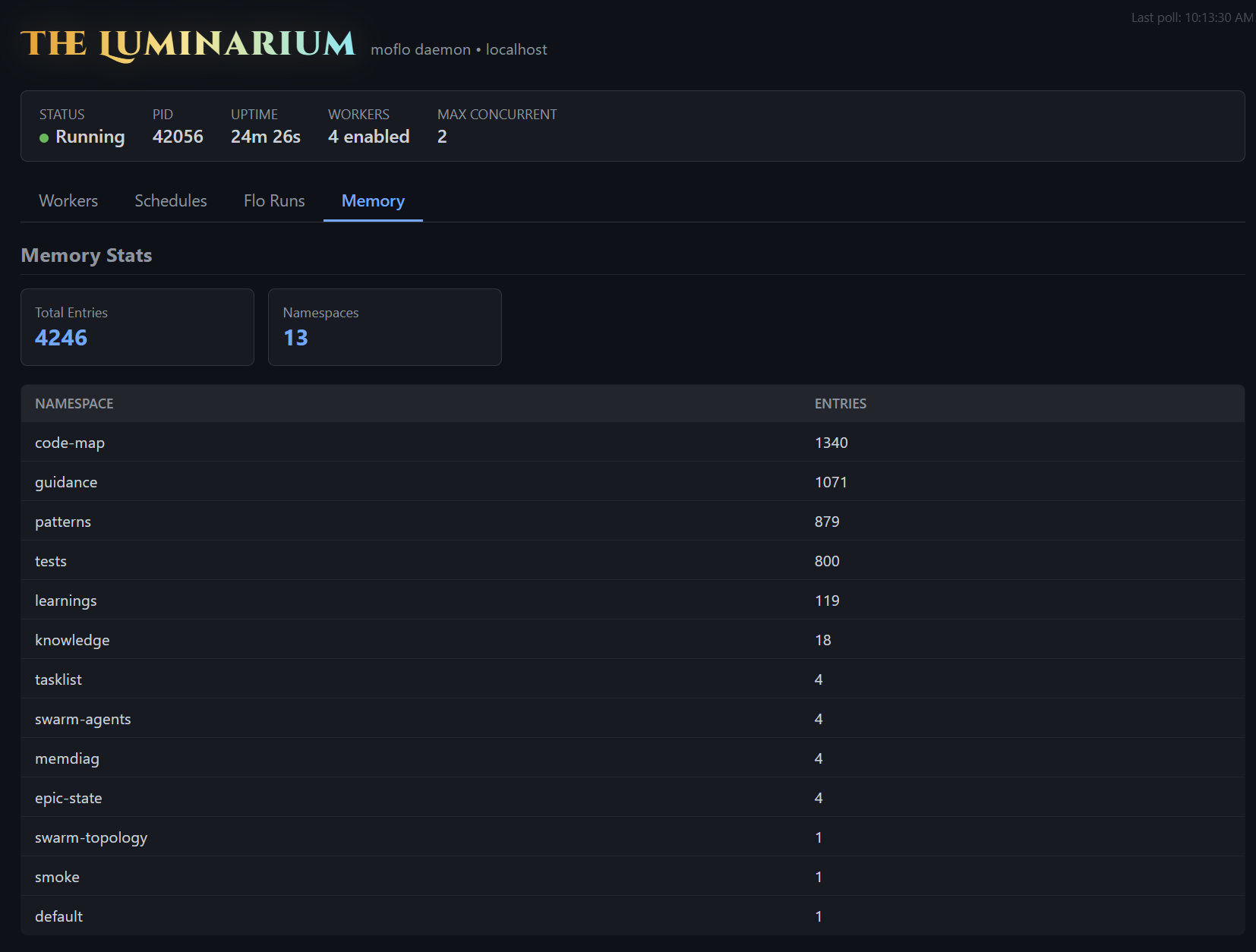
The fourth tab is a window into the MoFlo DB itself — the single sql.js + HNSW store at .moflo/moflo.db that backs memory, swarm coordination, learned routing, and AIDefence patterns. The summary cards show total entries and namespace count; the table below breaks it down by namespace.
The numbers tell you a lot in a glance:
code-mapin the thousands means the indexer has actually walked your repo. If it’s at 0 or 1, the worker hasn’t run yet, or yourmoflo.yamlis excluding the wrong directories.guidancein the hundreds means your project guidance docs are chunked and embedded. If it’s empty, Claude has no project conventions to consult — that’s the single highest-leverage gap to close, and exactly what/eldarand/guidance -aare for.patternsandlearningsclimb over time as the team uses Claude. They’re how MoFlo gets smarter at your project specifically.testspopulated means the test-to-source mapping is in place; Claude can answer “what tests cover this module?” from the index.swarm-agents,swarm-topology,tasklist,epic-state— the operational state of the multi-agent layer and any in-flight epic. Persistent across restarts.
If a namespace looks suspiciously thin, that’s almost always a configuration story — and one you can fix in a few minutes once you can see it.
Claude Stats — what has Claude been up to in this project?
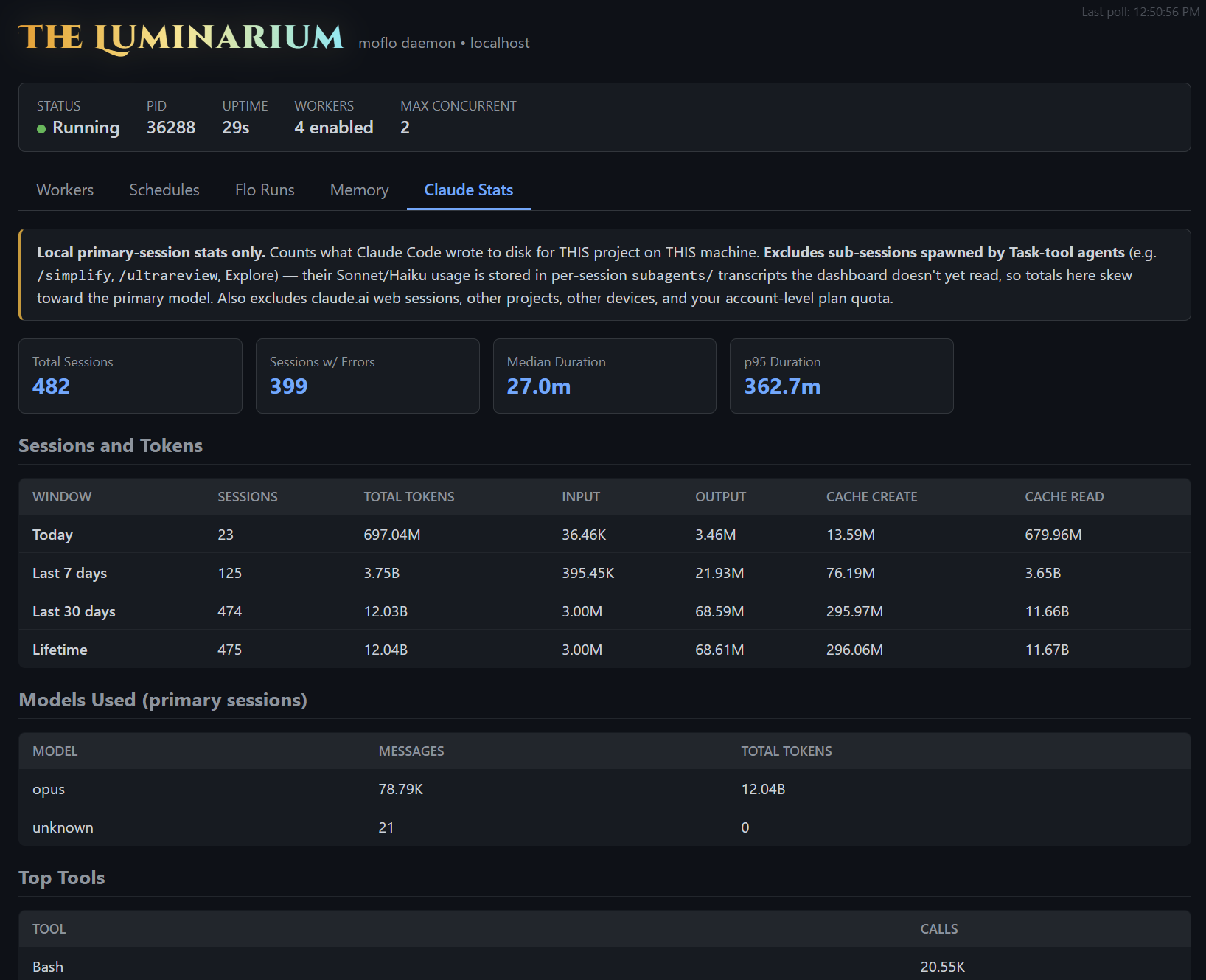
The newest tab steps outside MoFlo’s own internals and reads what Claude Code itself has been doing on your machine, for this project specifically. Every Claude Code session leaves a JSONL transcript in ~/.claude/projects/<project>/; the Luminarium aggregates them locally and surfaces the totals across today / 7 days / 30 days / lifetime windows: sessions, input/output/cache tokens, the model distribution, top tool calls, error-tagged sessions, and median session duration.
It’s the only tab that crosses the boundary between MoFlo and Claude. Everywhere else you’re looking at MoFlo’s own state. Here you’re looking at what Claude has accomplished locally, with MoFlo as the lens — and like every other tab, the data never leaves your machine.
A few honest caveats baked into the banner at the top so the numbers don’t get misread:
- Local primary-session stats only. Counts what Claude Code wrote to disk for this project on this machine. Not your account-level usage, not other devices, not
claude.aiweb chats. - Excludes sub-sessions spawned by Task-tool agents (
/simplify,/ultrareview, Explore, and so on). Those run in their own per-sessionsubagents/transcripts that the dashboard doesn’t yet walk, so the model distribution skews toward the primary model and the totals undercount real Sonnet and Haiku traffic. Closing that gap is on the roadmap. - No estimated cost. Pricing varies wildly by subscription tier and any account-level discounts, so rather than render a number that risks misleading you, we just don’t. Token totals are the honest signal.
What it’s actually useful for: spotting whether your sessions are mostly clean or mostly error-laden, seeing which tools you’re hammering on (Read, Grep, Bash usually top the list), and watching your token mix shift week over week as the team’s habits change. It’s a candid little usage mirror, scoped to one project, sitting next to MoFlo’s own machinery — so the question “is something off today?” can be answered for both halves of the system in the same tab strip.
How to conjure it
You don’t, really. The daemon starts with your project — and the daemon starts the Luminarium with it. As long as your daemon is up:
http://localhost:3117That’s the whole onboarding. If the daemon is dead, flo healer --fix will revive it. If the port is in flight elsewhere, the daemon flags will let you change it (--dashboard-port 3118) or disable it (--no-dashboard).
It’s read-only by design. You can’t edit memory, kill workers, or cancel runs from this UI — that’s what the CLI and MCP tools are for. The Luminarium is for seeing, not doing. Which is exactly what makes it safe to leave open in a tab all day.
Why this matters
The whole point of MoFlo is that it accumulates knowledge in the background so Claude can show up to a session already knowing things. That works beautifully when it works — and silently fails to its full potential when something in the background is misconfigured, stale, or quietly broken. “Why does Claude keep re-grep-ing my codebase?” almost always traces back to one of the panels above: a worker that hasn’t run, a memory namespace that didn’t get populated, a scheduled spell that’s been failing for a week, an epic that crashed mid-flight.
The Luminarium turns “I don’t know why MoFlo feels off today” into “the consolidate worker hasn’t run in 4 hours, and that’s why search is dusty.” That’s the entire pitch.
MoFlo is, and will stay, free and open source. The Luminarium ships with it. If you’re already running the daemon, you’ve already got it — just open the tab.
Curious how it looks on your project? Conjure the Luminarium.
npm: npmjs.com/package/moflo — npm install --save-dev moflo
GitHub: github.com/eric-cielo/moflo
Leave a Reply